Write about your day
Part ofDiaryWrite
A photo shows what a day looked like. It can’t hold what people said or how you felt. A few lines in your diary bring that back when you look at the photos later.
The menu and the bottom bar call it ‘Diary’. It is free on every plan. The glossary explains the words the app uses.
When it helps
Section titled “When it helps”- Your child takes their first steps. You write down how it felt, next to the photos.
- On a trip, you want to remember the name of a dish or a story someone told you.
- In a family space, Mom and Dad write about the same day together.
One entry a day, with its photos
Section titled “One entry a day, with its photos”- You write one entry for each date. Open the same day again and you keep writing the same entry.
- The photos you took that day show up below the entry, under ‘Photos in this entry’. You don’t need to attach them.
- Your writing saves as you type. There is no save button.
Write an entry
Section titled “Write an entry”- In the bottom bar or the menu, tap ‘Diary’. This month’s calendar opens.
- Tap the day you want to write about.
- Tap ‘Write about this day’. For today, you see ‘Write today’s entry’.
- Type a title in ‘Title (optional)’. You can leave it empty.
- Write your story in the ‘How was today?’ box.
- When you are done, tap ‘Done’.
You can also open today’s entry with ‘Write’ at the top of the calendar. You can’t pick a day that hasn’t come yet.
Look back with the calendar
Section titled “Look back with the calendar”‘Diary’ opens on a month calendar. On each day you wrote about, a photo from that day fills the square. Seeing the photo helps you remember what you wrote.
- To see another month, tap the month’s name and pick one in ‘Choose a month’. On a phone, you can also swipe the calendar sideways.
- Tap a day you wrote about.
- Tap ‘Read’.
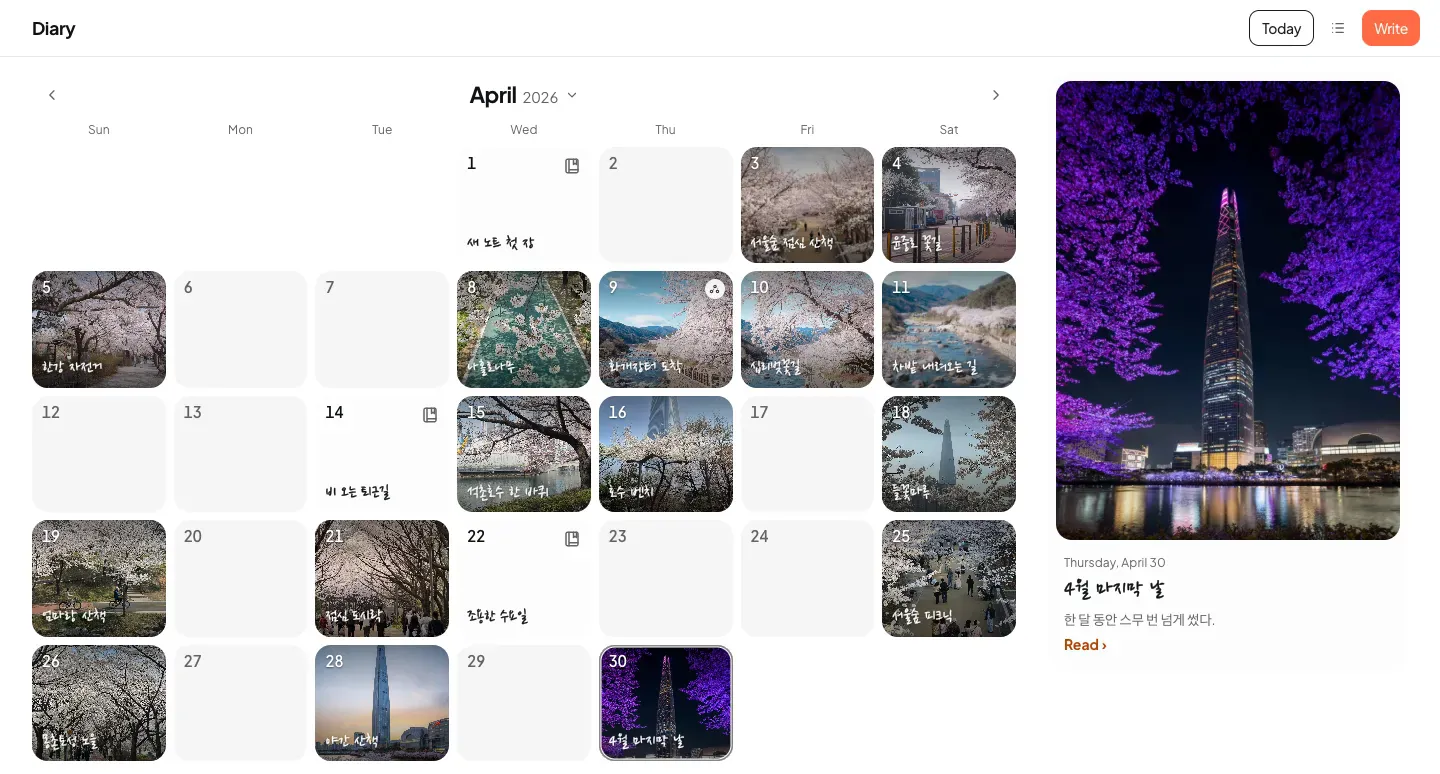
- To come back to this month, tap ‘Today’.
- To see your entries as a list by date, tap ‘Show as a list’. In the list, tap ‘Add entry’ and pick a date in ‘Choose a date to write’.
- A story you wrote in a journey shows on the day the journey started, as a ‘Journey entry’. See Journeys for how to write one.
Edit an entry or change its cover
Section titled “Edit an entry or change its cover”An entry you already wrote opens for reading first.
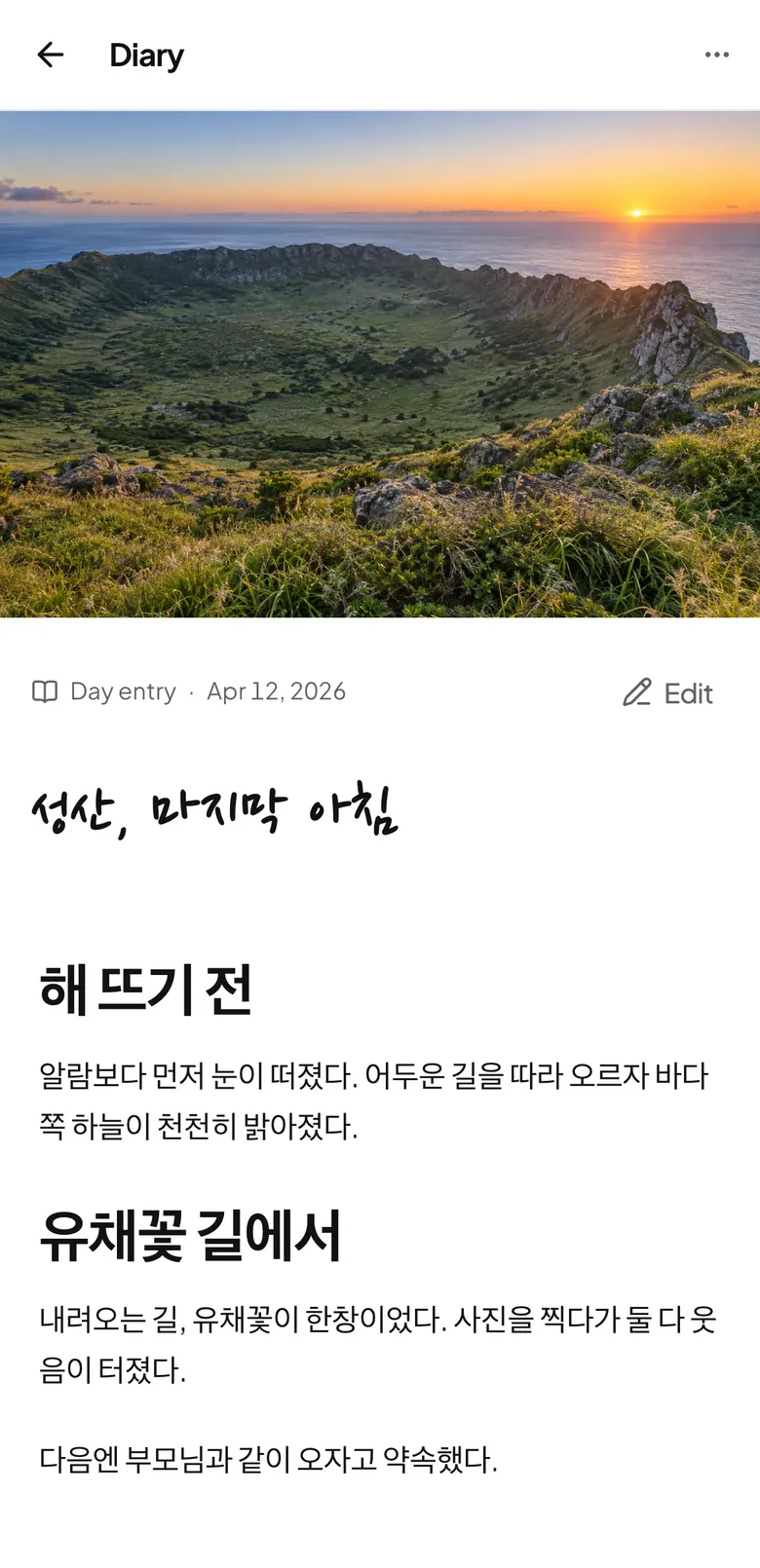
- Open the entry and tap ‘Edit’.
- Change what you want.
- Tap ‘Done’.
To change the entry’s cover photo, choose a photo under ‘Cover photo’ and tap ‘Use as cover’. To let the app choose again, tap ‘Pick automatically’.
Write together with family
Section titled “Write together with family”In a space, several people can write the same day’s entry together. If you don’t have a space yet, see Make a space to share with family first.
- Open the space.
- Under ‘How to view this space’, choose ‘Diary’. You see a calendar with only this space’s entries.
- Tap the day you want, then tap ‘Write about this day’. From the space’s ‘Feed’, you can also start with ‘Write a story’.
- Write your story.
- If someone else is writing the same entry at the same time, you see their name where they are typing.
- Type @ in the entry and names of people in the space appear. Pick a name and that person gets a notification.
- Owners and editors can write. Viewers can only read.
- Entries in a space don’t appear in your own ‘Diary’ calendar. They show only in that space.
Delete and restore
Section titled “Delete and restore”- Open the entry you want to delete.
- Tap the three-dot button at the top of the entry.
- Choose ‘Delete’.
- In ‘Delete this entry?’, tap ‘Delete’.
If you deleted it by mistake, tap ‘Undo’ in that message right away. To restore it later:
- Tap the three-dot button at the top of the ‘Diary’ screen.
- Choose ‘Recently deleted’.
- Tap ‘Restore’ next to the entry.
After 30 days, it is gone for good
Deleted entries stay in ‘Recently deleted’ for 30 days only. After that, you can’t restore them. Photos from that day are not deleted.
- Only the person who wrote an entry can delete it.
- If the same day already has a new entry, you can’t restore the old one. Delete the new entry first.
Your entries in spaces you left
Section titled “Your entries in spaces you left”When you leave a space, the entries you wrote there stay in the space. In your own ‘Diary’ list, you find them under ‘Your entries in spaces you left’. You can only read or delete them. If you delete one there, you can’t restore it.
If it doesn’t work
Section titled “If it doesn’t work”| What the screen says | What it means, and what to do |
|---|---|
| Saving… | It is saving now. Wait a moment |
| Saved on this device, waiting to connect | The internet dropped, so your phone saved it first. It finishes saving when you are back online |
| Couldn’t save these changes | Tap ‘Save again’ |
| This day already has an entry | The day you want to restore to has a new entry. Delete the new one, then restore again |
- In a space, you don’t see ‘Write about this day’. If you are a viewer in that space, you can only read.
- You can’t tap a date. That day hasn’t come yet. You can write about it when it comes.
Read next
Section titled “Read next”The chat could not open. Please email us at contact@firstage.ai