Invite family to a space
Part ofSpaces and invitationsTogether
There are two ways to bring people into a space. You can send a link and a 6-digit code in a chat or text message, or you can send an email invitation. Inviting is free on every plan.
When it helps
Section titled “When it helps”- Your parents rarely check email. Send them the link in KakaoTalk instead.
- You want to invite the whole family chat at once. One link lets several people join.
- You are on the phone with someone. Read the 6-digit code out loud.
Before you start
Section titled “Before you start”- You are the owner of the space. Only owners can invite.
- If you don’t have a space yet, create one first.
Invite with a link and a code
Section titled “Invite with a link and a code”- Open the space you want to invite people to.
- Tap the people button at the top of the space. It shows how many people are in it. ‘Manage Members’ opens.
- Under ‘Invite with a link’, choose ‘People who can join’. It starts at ‘Up to 10’.
- Tap ‘Create invite link’.
- A 6-digit number appears under ‘Invite code’. Send it with one of these buttons:
- ‘Send invite on KakaoTalk’: choose a chat and send an invite card.
- ‘Share’: send it by text message or another app. The code and the link go together.
- ‘Copy link’ or ‘Copy code’: copy it, then paste it into a chat.
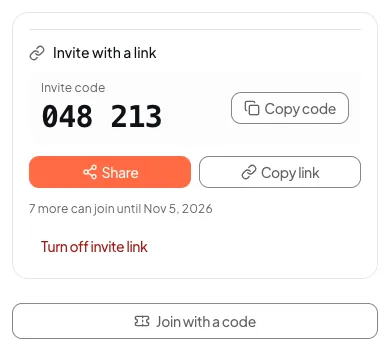
‘Send invite on KakaoTalk’ only appears where KakaoTalk sharing works. If you don’t see it, use ‘Share’.
What the other person does is in Join a space you were invited to. You can send them that page too.
Good to know
Section titled “Good to know”- The link and code work for 7 days from when you make them. They close sooner if the number of people you chose have all joined.
- Anyone who has the link or code can sign in and join. Send it only to people you mean to invite.
- The code and link show again only on the device that made them. On another device, you need to tap ‘Create a new link’.
- When you tap ‘Create a new link’, the old link and code stop working.
Turn off the invite link
Section titled “Turn off the invite link”- Open ‘Manage Members’.
- Under ‘Invite with a link’, tap ‘Turn off invite link’.
- In ‘Turn off the invite link?’, tap ‘Turn off invite link’ again.
Invite by email
Section titled “Invite by email”The other person must sign in with that same email account to join. Use this when you know their exact email address.
- Tap the people button at the top of the space to open ‘Manage Members’.
- Type the email address in the ‘Invite’ box.
- Tap the ‘Invite’ button.
Next to an invitation, ‘Open invitation menu’ lets you:
- ‘Copy invite link’: send the link yourself instead of the email.
- ‘Resend email’: send it again with a new link. The old link stops working.
- ‘Cancel invite’: take the invitation back.
Email invitations also expire 7 days after you send them. You can’t invite an email address that is already in the space.
Invite while you create a space
When you create a space, you can type email addresses in ‘Invite people’. They get an invitation too.
If it doesn’t work
Section titled “If it doesn’t work”- ‘Invite with a link’ is missing. Only the owner sees it. Ask the owner to invite people.
- You see a sentence instead of the invite code. The link was made on another device. Tap ‘Create a new link’ to get a new code.
- The other person sees ‘This invitation was sent to a different email address.’ An email invitation only works with that email account. Invite them again with a link and code, which work with any account.
- Someone you removed wants to come back. Old links don’t let them in. Invite them again.
Read next
Section titled “Read next”The chat could not open. Please email us at contact@firstage.ai